This website uses cookies
This website uses cookies. For further information on how we use cookies you can read our Privacy and Cookie notice

This website uses cookies. For further information on how we use cookies you can read our Privacy and Cookie notice
/product/98/2107952/1.jpg?0787)
/product/98/2107952/2.jpg?0787)
/product/98/2107952/3.jpg?0787)
/product/98/2107952/4.jpg?0787)
/product/98/2107952/5.jpg?0787)
2 units left

Free return within 7 days for eligible items.Details
BAGS SHIP
74%Seller Score
25 Followers
Shipping speed: Good
Quality Score: Excellent
Customer Rating: Poor

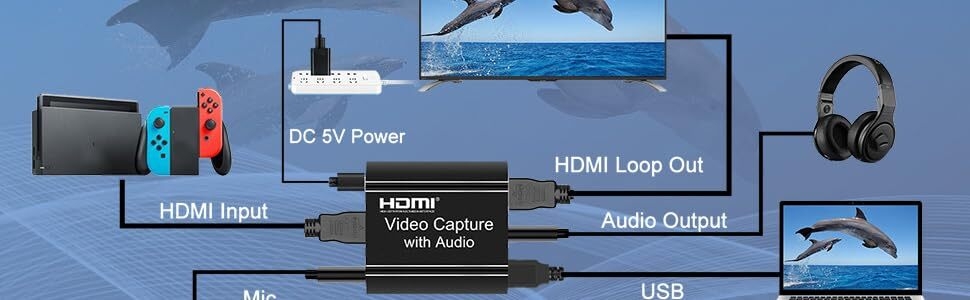
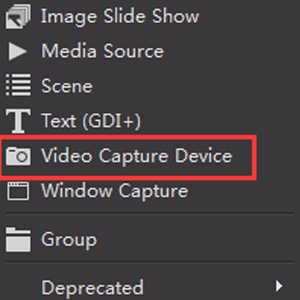
1. Open OBS as shown in Figure 1-1: Click the "+" source to add a video source.
2. Double-click the video source added in the red box above to enter the setting page.
3. In the red arrow bar, select "Video Capture Device".
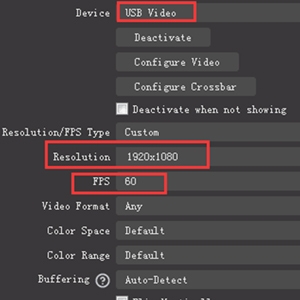
2.1 Select Device: USB Video
2.2 Custom Resolution: Set Resolution/FPS Type to "Custom"
2.3 Set the resolution: 1920x1080
2.4 Set the frame rate: 60 frames per second
2.5 Set video format: select "Any"
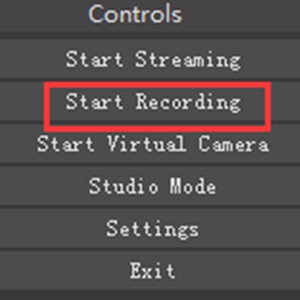
Click "Start Recording" to record the video and audio of the source.
Your recording file will be saved in the file in the upper left corner.


This product has no ratings yet.
/product/98/2107952/1.jpg?0787)