
HomeElectronicsCamerasSecurity & Surveillance CamerasDome CCTV CamerasMulti-function selfie stick - Multicolor


Share this product
UGX 35,000
UGX 40,00013%
In stock
+ shipping from UGX 2,900 to Central Business District
0 out of 5
(No ratings available)Variation available
Promotions
Delivery & Returns
Choose your location
Pickup Station
Delivery Fees UGX 2,900
Ready for pickup between 21 November and 24 November if you place your order within the next 21hrs 38mins
Door Delivery
Delivery Fees UGX 4,600
Ready for delivery between 21 November and 24 November if you place your order within the next 21hrs 38mins
Return Policy
Free return within 7 days for eligible items.Details
Seller Information
Aijar merchandise
58%Seller Score
72 Followers
Seller Performance
Shipping speed: Good
Quality Score: Average
Customer Rating: Good
Cancellation Rate: Very Poor
Product details
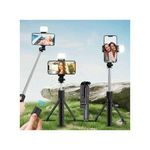
multi-function selfie stick (Model: SF002), a versatile tool that combines a handheld selfie stick with a stable tripod stand.
Key Specifications & Features
- Dimensions: It has a compact folded size of 19.3 cm and can expand to a maximum length of 105 cm [Image].
- Rotatable Design: Features a 360-degree rotating phone holder, allowing for easy switching between portrait and landscape modes [Image].
- Wireless Connectivity: Includes a detachable Bluetooth remote control for hands-free photo and video capture.
- Stability: The handle base unfolds into a tripod for stationary use.
How to Use the SF002
- Pairing the Remote:
- Press and hold the button on the remote for about 2–3 seconds until a blue or green indicator light begins to flash.
- Enable Bluetooth on your phone and search for a device likely named "Selfie" or similar to pair.
- Mounting Your Phone:
- Unfold the phone clamp and insert your device widthwise. The spring-loaded design typically accommodates most standard smartphones.
- Using the Tripod:
- Gently flip open the legs at the base of the handle until they lock into place for a stable surface mount.
- Taking Photos:
- Open your camera app and short-press the button on the remote to capture a shot or start/stop a video.
Tip: If the remote doesn't trigger your camera, check your phone's camera settings to ensure the volume button is set to act as a shutter release.
Specifications
Key Features
multi-function selfie stick a versatile tool that combines a handheld selfie stick with a stable tripod stand.
Key Specifications & Features
- Dimensions: It has a compact folded size of 19.3 cm and can expand to a maximum length of 105 cm [Image].
- Rotatable Design: Features a 360-degree rotating phone holder, allowing for easy switching between portrait and landscape modes [Image].
- Wireless Connectivity: Includes a detachable Bluetooth remote control for hands-free photo and video capture.
- Stability: The handle base unfolds into a tripod for stationary use.
How to Use
- Pairing the Remote:
- Press and hold the button on the remote for about 2–3 seconds until a blue or green indicator light begins to flash.
- Enable Bluetooth on your phone and search for a device likely named "Selfie" or similar to pair.
- Mounting Your Phone:
- Unfold the phone clamp and insert your device widthwise. The spring-loaded design typically accommodates most standard smartphones.
- Using the Tripod:
- Gently flip open the legs at the base of the handle until they lock into place for a stable surface mount.
- Taking Photos:
- Open your camera app and short-press the button on the remote to capture a shot or start/stop a video.
Tip: If the remote doesn't trigger your camera, check your phone's camera settings to ensure the volume button is set to act as a shutter release.
Specifications
- SKU: GE779CM4AOSXMNAFAMZ
- Weight (kg): 0.1
Customer Feedback

This product has no ratings yet.
Multi-function selfie stick - Multicolor
UGX 35,000
UGX 40,00013%
Questions about this product?